How to hand over LiveChat account ownership: Let the new person in charge take over subscription management
For LiveChat accounts subscribed to per seat, a handover between responsible parties requires the transfer of license ownership. This step is not automatically completed when a new regular administrator is added.
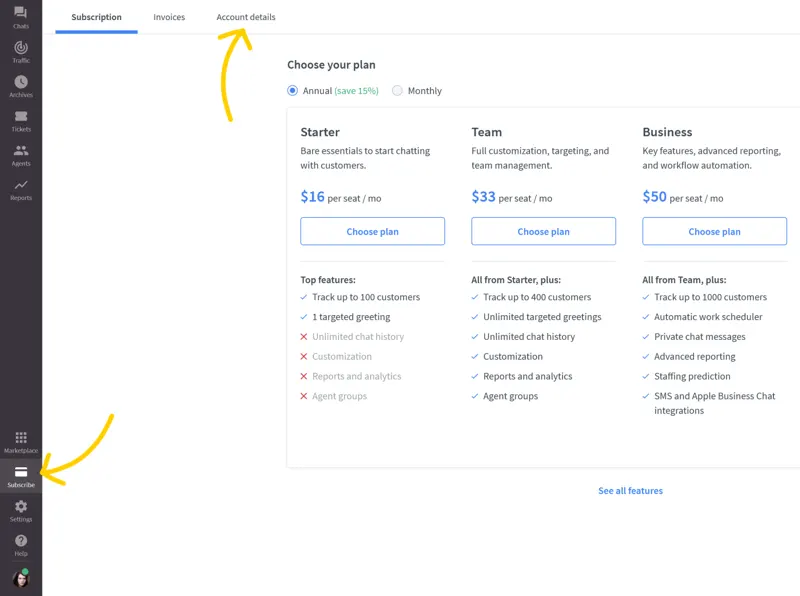
When changing customer service managers, first confirm whose account the license is currently registered under. In the per-seat subscription management process, only one owner can access the Subscription section to manage subscriptions and renewals at any given time. It is recommended to verify the incoming manager's login account and confirm they can access the current customer service workspace before scheduling a handover.
Log in to the Upgrade section as the current owner and open Account details on the left. Locate the section displaying the current owner, click the edit icon next to it, select the successor from the existing agent list, verify their identity, and then execute Change owner. If colleagues have similar names, first identify the account they are using in the team list to avoid granting the highest privileges to members with the same name.
After ownership changes, have the new person in charge log in with their own account to confirm they can view and manage subscriptions. The handover form should record the work area, verification date, and the person responsible for handling renewals, and update the authorized contact person within the team. If managing multiple brands or different licenses, each should be checked individually to avoid only handing over one work area.